Remember why you drove
Showings, open houses, inspections, and client meetings get their own business purposes. Commute and personal miles stay separate.
Track your drives, review business miles, and understand vehicle costs. Gig drivers can also compare supported Uber and Lyft offers with their own pay targets. Pro adds deeper estimates and accountant report packages.
For gig drivers and professionals whose work takes them places.
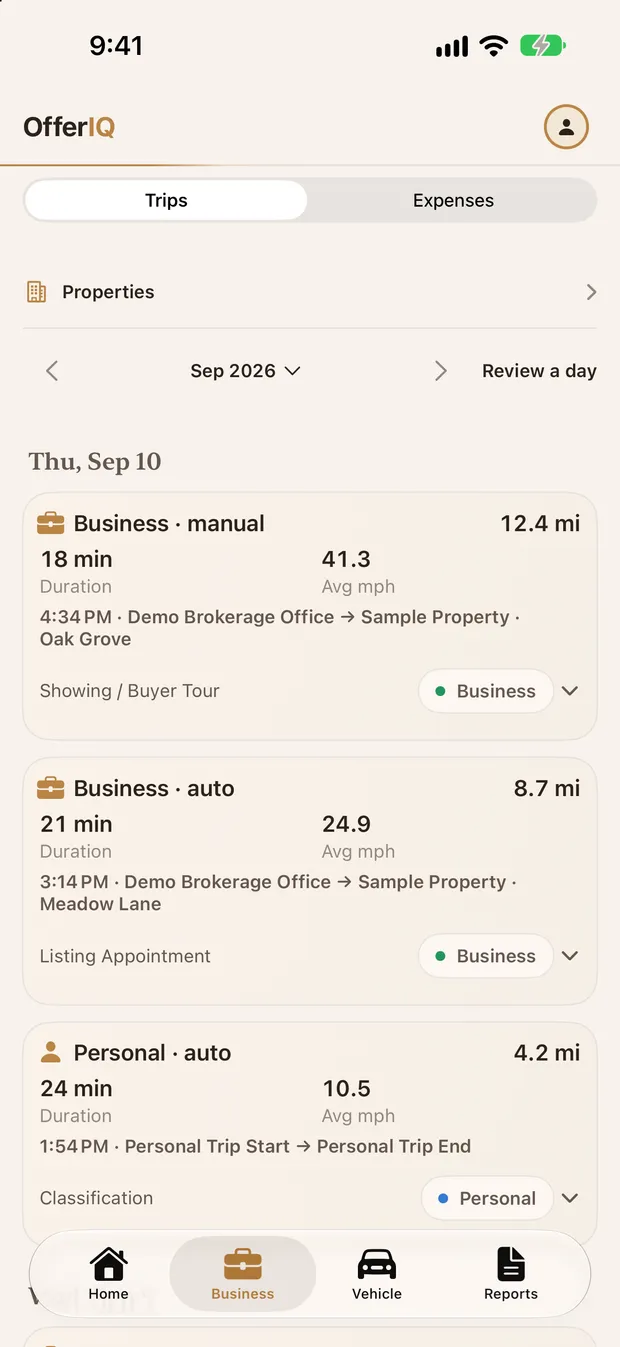
A Real Estate workspace for the miles, expenses, properties, and clients behind your day. Keep business purpose with each trip and review the records before you export.
Real Estate tools are available in the latest App Store version of OfferIQ.
Explore Real Estate mileageShowings, open houses, inspections, and client meetings get their own business purposes. Commute and personal miles stay separate.
Link trips and manual expenses to properties or clients. Raw trip data and the separate expense ledger are free to export.
Pro adds optional Calendar rules, receipt text extraction, bulk trip review, and accountant PDF/CSV packages.
Larger offer cards bring your rates, target result, stops and reservation reminders together.
Planned for an upcoming App Store update. These changes are not yet publicly available.
Compare supported offers with your targets, keep the purpose behind Real Estate trips, and understand the car you use for work. These screens use fictional demo records.
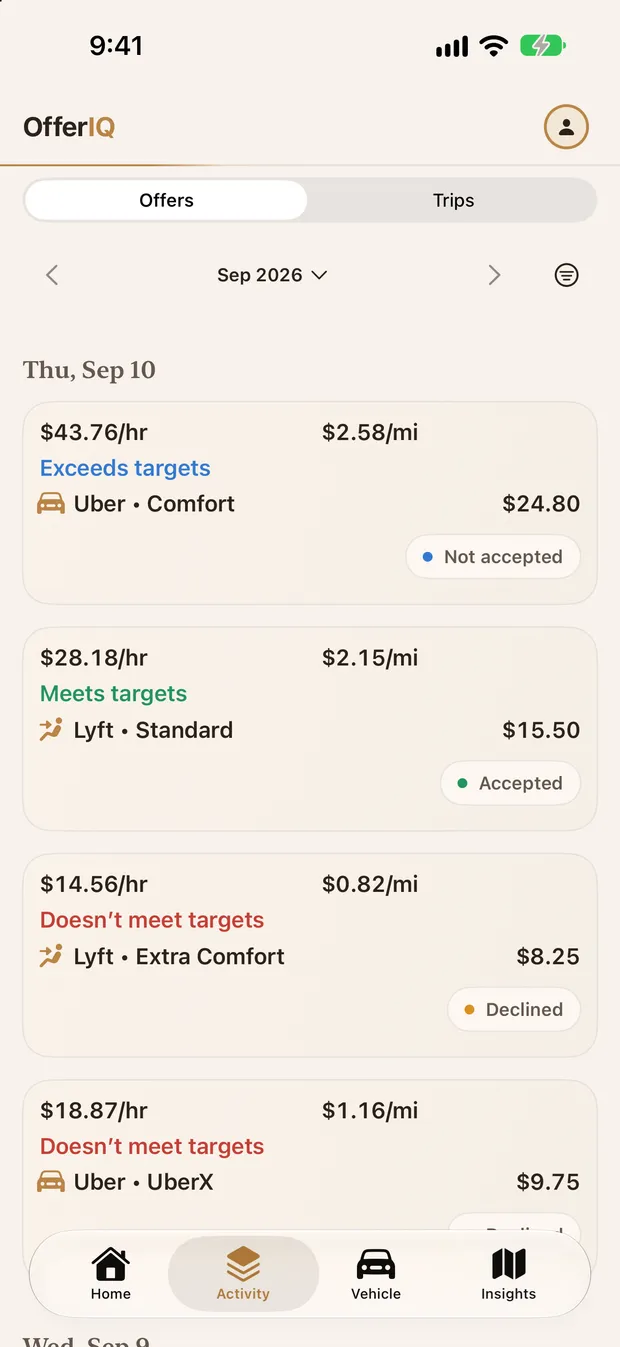
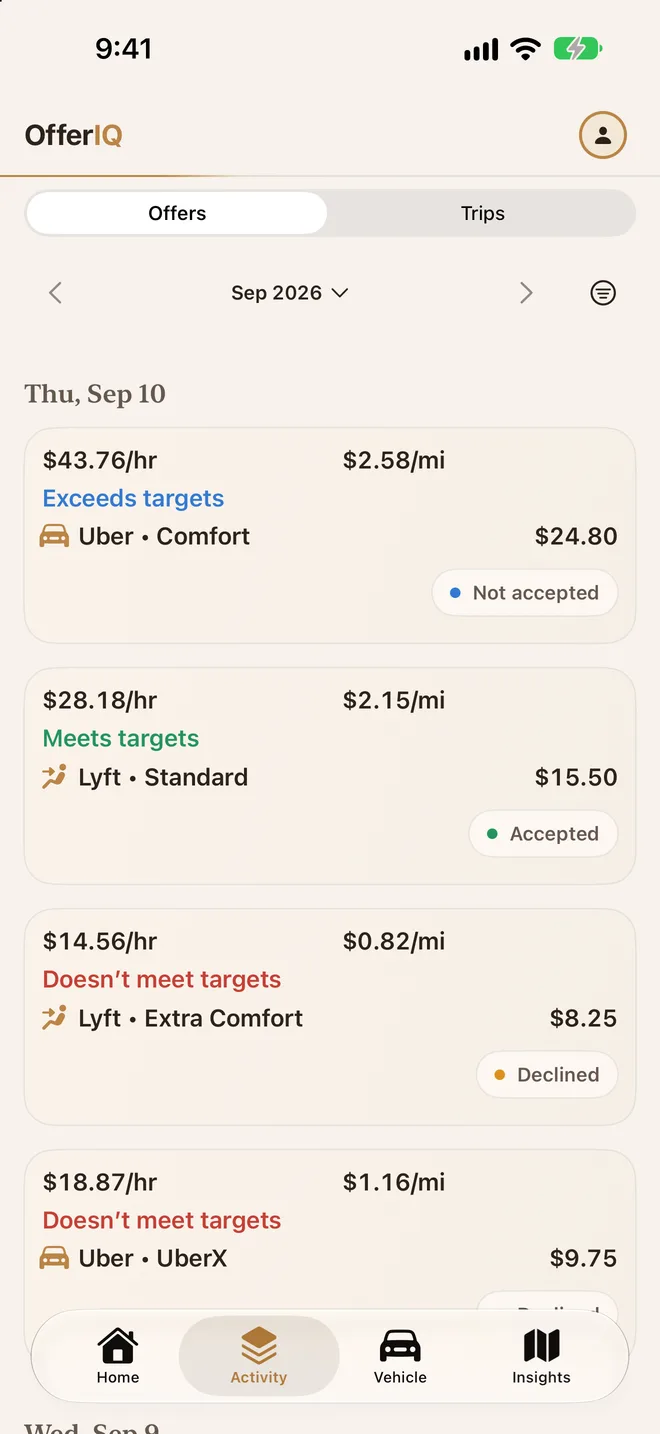
Set minimum and preferred $/hour and $/mile targets. Each supported screenshot shows Exceeds targets, Meets targets, or Doesn’t meet targets, with the reason behind it.
Optional automatic tracking combines multiple driving signals. Review, edit, or add any trip yourself.
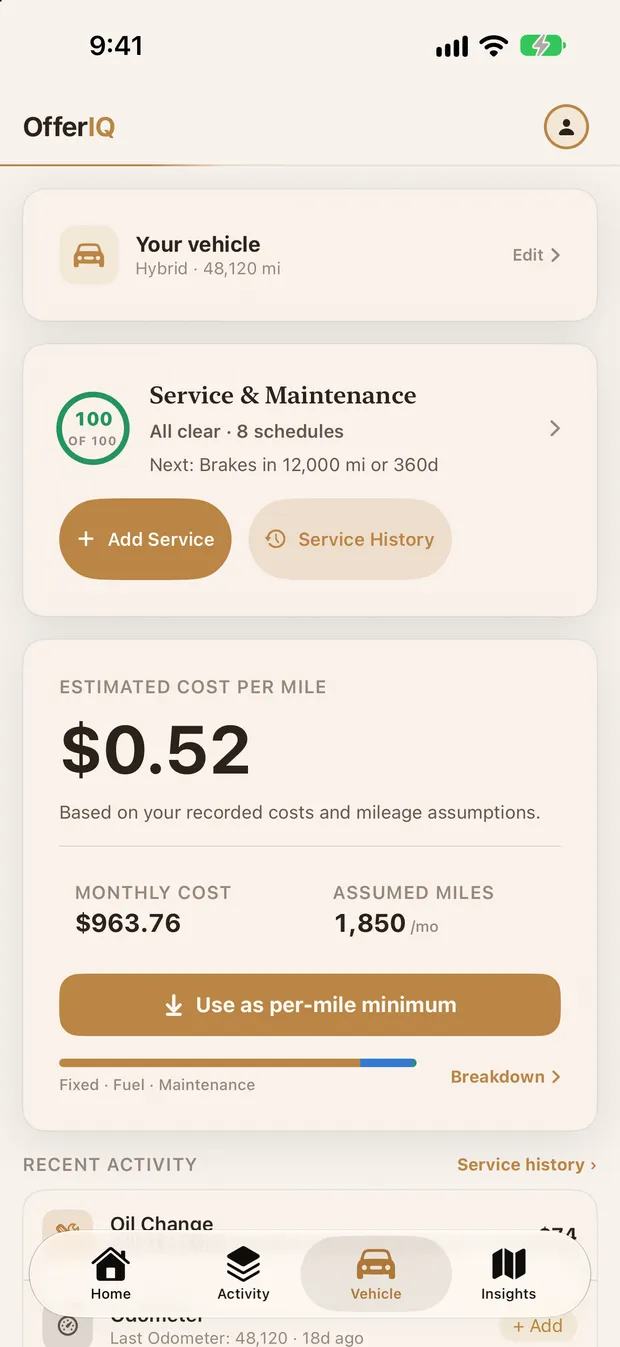
Estimate cost per mile from your vehicle inputs and compare it with offer pay as separate cost evidence.
With Pro, combine accepted offered pay, tracked miles, and modeled vehicle costs to estimate net profit, net per hour, and net per mile.
Review the same driving records behind your mileage totals, cost estimates, and reports. Driver offer analysis stays part of OfferIQ.
Capture a supported Uber or Lyft offer and on-device OCR reads it, estimates the dollars-per-hour and dollars-per-mile, and compares it against your own thresholds — with a one-line reason so you know why.
A confidence-based engine can record drives automatically by combining motion, GPS, configured car Bluetooth, power, Wi-Fi, and offer activity. Every trip remains reviewable and editable.
Build a vehicle cost profile — payment, insurance, registration, depreciation, fuel or electricity, and maintenance — and OfferIQ estimates the cost of each mile, broken into fixed, energy, and maintenance. The modeled cost appears separately from your offer target result.
Free Insights show gross earnings, acceptance, comparisons, and time/day patterns. Pro adds estimated net profit — accepted-offer gross minus the modeled running cost of tracked miles — plus net rates and an estimated mileage deduction.
Enter the minimum and preferred dollars-per-hour and dollars-per-mile you'll drive for. Every offer from here on is judged against your standards, not a generic average.
Run the OfferIQ Shortcut with a supported offer screenshot. On-device OCR estimates the rates, compares both rates against your targets, and can read the result aloud. Use your phone only when it is safe and legal.
The multi-signal engine can detect a trip and record its miles automatically. Review the suggested business or personal classification whenever you are safely parked.
Free Insights show your strongest recorded hours and days. Pro adds estimated net take-home and exports a mileage summary and per-trip ledger for your records or tax professional.
Keep the core offer and mileage tools free. One Pro purchase covers your enabled workspaces, with automation and reporting when you need them.
Track, review, and keep your records
Download freeMore assistance. Less record cleanup.
US App Store prices in USD. Local prices and purchase terms appear in the app. Subscriptions renew until canceled.
Real Estate tools are available in the latest App Store version of OfferIQ. The Real Estate workspace brings trip purposes for showings, open houses, inspections, and client meetings, plus property, client, and expense records. You can enable Real Estate, Rideshare, or both. Existing offer analysis and mileage tools remain available.
For supported formats, it reads the offer from a screenshot, estimates dollars-per-hour and dollars-per-mile, and scores both against the minimum and preferred rates you set. Exceeds targets means both rates reach their preferred targets. Meets targets means both reach their minimums, with at least one below preferred. Doesn’t meet targets means either rate falls below its minimum. A plain reason explains the result. Optional wait-time and per-stop assumptions can make the hourly estimate more realistic for your workflow.
No. Run the OfferIQ Shortcut with a supported offer screenshot and on-device OCR reads it for you. OfferIQ can announce the result aloud; use your phone only when it is safe and legal.
It combines motion, GPS, car Bluetooth, power, Wi-Fi, saved places, and offer activity instead of relying on one weak signal. Bluetooth detection is limited to a configured vehicle, and sustained-stop logic helps avoid ending a drive at a stoplight or pickup wait. You can review, edit, and reclassify every trip.
No. Mileage Tracking is optional and can be switched off. Your existing trips remain available and exportable, and offer analysis, vehicle-cost tools, and other non-mileage features keep working without background mileage tracking.
Yes. OfferIQ 3.2.5 adds a Classify Trip widget with your configured business purpose and Personal for the current or latest trip. Add it to your car’s widget screen using iPhone Settings. Widget buttons require iOS 26 or later and a touchscreen CarPlay display. Configure your business purposes in OfferIQ’s Workspaces settings; trips with mixed purposes still need detailed review on iPhone.
A trip-ready reminder can appear in CarPlay after an eligible saved trip still needs classification. Delivery depends on the Trip Ready for Review preference, notification permission, quiet hours, and iOS Focus settings. The widget screen does not open automatically, and tapping a notification opens review without classifying a trip.
It's a modeled estimate built from the vehicle inputs you provide—payment, insurance, registration, depreciation, fuel or electricity, and maintenance. OfferIQ shows separate cost evidence when per-mile pay is below that estimate. Cost evidence never changes the target result. Pro uses the model for estimated net Insights.
Yes. OCR, offer analysis, and mileage processing run on-device. Your saved offer, trip, and vehicle records are stored on your device and sync through your private iCloud account using Apple CloudKit. CHOFR does not operate an external server for driver records or use advertising-tracking SDKs in the app.
OfferIQ keeps reviewable mileage records and estimates a standard-mileage deduction. Pro adds accountant PDF and CSV report packages. The Real Estate workspace includes a free separate expense ledger and raw trip CSV. Captured expenses stay separate from mileage estimates. Review your records with a tax professional before filing.
OfferIQ recognizes supported Uber and Lyft offer screenshot formats. Mileage and vehicle-cost tools also work for delivery and other business driving. It’s a native iPhone and iPad app. Real Estate tools are available in the latest App Store version of OfferIQ.
Yes. Offer analysis, modeled vehicle costs, automatic mileage, and individual trip review are free. Pro adds estimated net, automation, advanced reports, and maintenance reminders. Real Estate includes free manual expenses, property/client records, and raw exports; Calendar assistance, receipt text extraction, bulk review, and accountant packages require Pro. One Pro purchase covers both roles.
Start with free automatic mileage and supported offer analysis. Add Pro when automation and deeper reports fit your day.
Free to start · On-device processing · Private iCloud sync · iPhone & iPad